Configuring Order Confirmation Email Templates For Multiple Shipping Address Orders 📥
When using Giftship’s multiple shipping address tool, edits need to be made to your Order Confirmation email template to account for this alternate shipping method. These edits will ensure that both single and multiple address checkouts are covered. There are two options for configuration.
Option 1
The simplest way to configure your Order Confirmation system is to follow these steps:
> Disable Notifications for follow-up orders.
Go to Apps -> Giftship -> Ship to Multiple Addresses -> and turn on the option to “Disable Notifications for follow-up Orders”. This will ensure that when your customer places an order going to multiple addresses, they will only receive one confirmation email, rather than an email per address.

> Copy and paste our pre-made template.
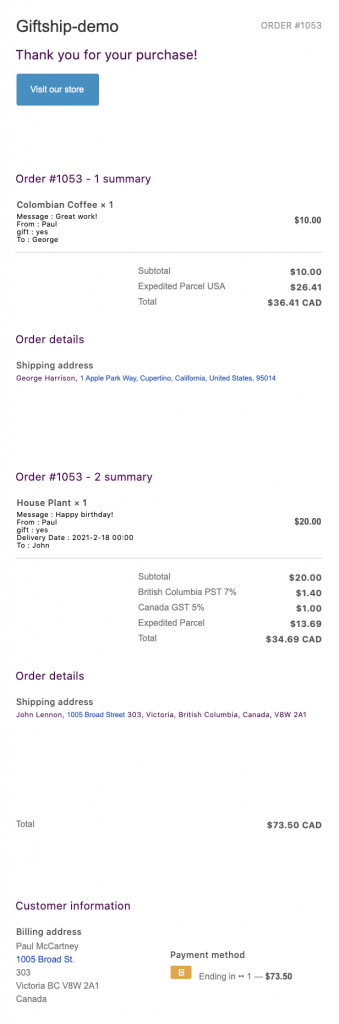
The following email template will allow the initial order that a customer receives when shipping to multiple addresses to neatly divide each suborder into its own section.
It will also show the note, message and delivery date fields. If you have customized the language tab within Giftship you may need to adjust some of the variables within this template. Here is an example of how it will look:
*** WARNING ***
By following the instructions below, you will overwrite any customizations you have made to your Order Confirmation template. If you have customized your template, you will need to incorporate your customizations into the below. We cannot support any third party customizations that are needed.
Copy / paste the follow code in your Order Confirmation template. Go to Settings -> Notifications -> Order Confirmation:
{% assign ms_order = false %}
{% for tag in order.tags %}
{% if tag == "ms_order" %}
{% assign ms_order = true %}
{% endif %}
{% endfor %}

{% capture email_title %}Thank you for your purchase! {% endcapture %}
{% capture email_body %}
{% if requires_shipping %}
Hi {{ customer.first_name }}, were getting your order ready to be shipped. We will notify you when it has been sent.
{% endif %}
{% endcapture %}
<!DOCTYPE html>
<html lang="en">
<head>
<title>{{ email_title }}</title>
<meta http-equiv="Content-Type" content="text/html; charset=utf-8"><meta name="viewport" content="width=device-width">
<link rel="stylesheet" type="text/css" href="/assets/notifications/styles.css">
<style>
.button__cell { background: {{ shop.email_accent_color }}; }
a, a:hover, a:active, a:visited { color: {{ shop.email_accent_color }}; }
</style>
</head>
<body>
<table class="body">
<tr>
<td>
<table class="header row">
<tr>
<td class="header__cell">
<center>
<table class="container">
<tr>
<td>
<table class="row">
<tr>
<td class="shop-name__cell">
{%- if shop.email_logo_url %}
<img src="{{shop.email_logo_url }}" alt="{{ shop.name }}" width="{{ shop.email_logo_width }}">
{%- else %}
<h1 class="shop-name__text">
<a href="{{shop.url}}">{{ shop.name }}</a>
</h1>
{%- endif %}
</td>
<td class="order-number__cell">
<span class="order-number__text">
Order {{ order_name }}
</span>
</td>
</tr>
</table>
</td>
</tr>
</table>
</center>
</td>
</tr>
</table>
<table class="row content">
<tr>
<td class="content__cell">
<center>
<table class="container">
<tr>
<td>
<h2>{{ email_title }}</h2>
<p>{{ email_body }}</p>
{% if order_status_url and ms_order == false %}
<table class="row actions">
<tr>
<td class="actions__cell">
<table class="button main-action-cell">
<tr>
<td class="button__cell"><a href="{{ order_status_url }}" class="button__text">View your order</a></td>
</tr>
</table>
{% if shop.url %}
<table class="link secondary-action-cell">
<tr>
<td class="link__cell"><a href="{{ shop.url }}" class="link__text"><span class='or'>or</span> Visit our store</a></td>
</tr>
</table>
{% endif %}
</td>
</tr>
</table>
{% else %}
{% if shop.url %}
<table class="row actions">
<tr>
<td class="actions__cell">
<table class="button main-action-cell">
<tr>
<td class="button__cell"><a href="{{ shop.url }}" class="button__text">Visit our store</a></td>
</tr>
</table>
</td>
</tr>
</table>
{% endif %}
{% endif %}
</td>
</tr>
</table>
</center>
</td>
</tr>
</table>

<!-- START SHOW REGULAR SINGLE ADDRESS ORDERS -->
{% if ms_order == false %}
<table class="row section">
<tr>
<td class="section__cell">
<center>
<table class="container">
<tr>
<td>
<h3>Order summary</h3>
</td>
</tr>
</table>
<table class="container">
<tr>
<td>
<table class="row">
{% for line in line_items %}
<tr class="order-list__item">
<td class="order-list__item__cell">
<table>
<td>
{% if line.image %}
<img src="{{ line | img_url: 'compact_cropped' }}" align="left" width="60" height="60" class="order-list__product-image" />
{% endif %}
</td>
<td class="order-list__product-description-cell">
{% if line.product.title %}
{% assign line_title = line.product.title %} {% else %} {% assign line_title = line.title %}
{% endif %}
{% if line.quantity < line.quantity %}
{% capture line_display %}
{{ line.quantity }} of {{ line.quantity }}
{% endcapture %}
{% else %}
{% assign line_display=line.quantity %}
{% endif %}
<span class="order-list__item-title">
{{ line_title }} × {{ line_display }}</span><br/>
{% if line.variant.title != 'Default Title' %}
<span class="order-list__item-variant">{{ line.variant.title }}</span>
{% endif %}
{% for p in line.properties %}
{% if p.first.first == "_" or p.last == '' %}
{% continue %}
{% endif %}
{{ p.first }} : {{p.last}}<br>
{% endfor %}
</td>
<td class="order-list__price-cell">
{% if line.original_line_price != line.line_price %}
<del class="order-list__item-original-price">{{ line.original_line_price | money }}</del>
{% endif %}
<p class="order-list__item-price">{{ line.line_price | money }}</p>
</td>
</table>
</td>
</tr>
{% endfor %}
</table>
<table class="row subtotal-lines">
<tr>
<td class="subtotal-spacer"></td>
<td>
<table class="row subtotal-table">
{% if discounts %}
{% capture discount_title %}Discount {% if discounts.first.code %}({{ discounts.first.code }}){% endif %}{% endcapture %}
<tr class="subtotal-line">
<td class="subtotal-line__title">
<p>
<span>{{ discount_title }}</span>
</p>
</td>
<td class="subtotal-line__value">
<strong>{{ discounts_savings | money }}</strong>
</td>
</tr>
{% endif %}
<tr class="subtotal-line">
<td class="subtotal-line__title">
<p>
<span>Subtotal</span>
</p>
</td>
<td class="subtotal-line__value">
<strong>{{ subtotal_price | money }}</strong>
</td>
</tr>
<tr class="subtotal-line">
<td class="subtotal-line__title">
<p>
<span>Shipping</span>
</p>
</td>
<td class="subtotal-line__value">
<strong>{{ shipping_price | money }}</strong>
</td>
</tr>
{% for line in tax_lines %}
<tr class="subtotal-line">
<td class="subtotal-line__title">
<p>
<span>{{ line.title }}</span>
</p>
</td>
<td class="subtotal-line__value">
<strong>{{ line.price | money }}</strong>
</td>
</tr>
{% endfor %}
</table>
<table class="row subtotal-table subtotal-table--total">
<tr class="subtotal-line">
<td class="subtotal-line__title">
<p>
<span>Total</span>
</p>
</td>
<td class="subtotal-line__value">
<strong>{{ total_price | money_with_currency }}</strong>
</td>
</tr>
</table>
{% assign transaction_size = 0 %}
{% for transaction in transactions %}
{% unless transaction.kind == "capture" or transaction.kind == "void" %}
{% assign transaction_size = transaction_size | plus: 1 %}
{% endunless %}
{% endfor %}
{% if transaction_size > 1 %}
<table class="row subtotal-table">
<tr>
<td colspan="2" class="subtotal-table__line"></td>
</tr>
<tr>
<td colspan="2" class="subtotal-table__small-space"></td>
</tr>
{% for transaction in transactions %}
{% if transaction.status == "success" and transaction.kind == "authorization" or transaction.kind == "sale" %}
{% if transaction.payment_details.credit_card_company %}
{% capture transaction_name %}
{{ transaction.payment_details.credit_card_company }} (ending in {{ transaction.payment_details.credit_card_last_four_digits }})
{% endcapture %}
{% else %}
{% capture transaction_name %}{{ transaction.gateway | replace: "_", " " | capitalize }}{% endcapture %}
{% endif %}
<tr class="subtotal-line">
<td class="subtotal-line__title">
<p>
<span>{{transaction_name}}</span>
</p>
</td>
<td class="subtotal-line__value">
<strong>{{ transaction.amount | money }}</strong>
</td>
</tr>
{% endif %}
{% if transaction.kind == 'refund' %}
{% if transaction.payment_details.credit_card_company %}
{% assign refund_method_title = transaction.payment_details.credit_card_company %}
{% else %}
{% assign refund_method_title = transaction.gateway %}
{% endif %}
<tr class="subtotal-line">
<td class="subtotal-line__title">
<p>
<span>Refund</span>
<br>
<small>{{ refund_method_title | capitalize }}</small>
</p>
</td>
<td class="subtotal-line__value">
<strong>- {{ transaction.amount | money }}</strong>
</td>
</tr>
{% endif %}
{% endfor %}
</table>
{% endif %}
</td>
</tr>
</table>
</td>
</tr>
</table>
</center>
</td>
</tr>
</table>
<table class="row section">
<tr>
<td class="section__cell">
<center>
<table class="container">
<tr>
<td>
<h3>Customer information</h3>
</td>
</tr>
</table>
<table class="container">
<tr>
<td>
<table class="row">
<tr>

{% if attributes['To'] %}
<td class="customer-info__item">
<h4>To:</h4>
{{ attributes['To'] }}
</td>
{% endif %}

{% if attributes['From'] %}
<td class="customer-info__item">
<h4>From:</h4>
{{ attributes['From'] }}
</td>
{% endif %}
</tr>
</table>

<table class="row">
<tr>
{% if attributes['Message'] %}
<td class="customer-info__item">
<h4>Message:</h4>
{{ attributes['Message'] }}
</td>
{% endif %}
{% if attributes['Delivery Date'] %}
<td class="customer-info__item">
<h4>Delivery Date:</h4>
{{ attributes['Delivery Date'] }}<br/>
</td>
{% endif %}
</tr>
</table>
<table class="row">
<tr>
{% if attributes['Order Notes'] %}
<td class="customer-info__item">
<h4>Order Notes:</h4>
{{ attributes['Order Notes'] }}
</td>
{% endif %}
</tr>
</table>
</tr>
<tr>
{% if billing_address %}
<td class="customer-info__item">
<h4>Billing address</h4>
{{ billing_address | format_address }}
</td>
{% endif %}
{% if requires_shipping and shipping_address %}
<td class="customer-info__item">
<h4>Shipping address</h4>
{{ shipping_address | format_address }}
</td>
{% endif %}
</tr>
</table>
<table class="row">
<tr>
{% if requires_shipping and shipping_address %}
<td class="customer-info__item">
<h4>Shipping method</h4>
<p>{{ shipping_method.title }}</p>
</td>
{% endif %}
{% assign transaction_count = transactions | size %}
{% if transaction_count > 0 %}
<td class="customer-info__item">
<h4>Payment method</h4>
{% for transaction in transactions %}
{% if transaction.status == "success" or transaction.status == "pending" %}
{% if transaction.kind == "authorization" or transaction.kind == "sale" %}
<p class="customer-info__item-content">
{% if transaction.payment_details.credit_card_company %}
{% capture credit_card_url %}notifications/{{ transaction.payment_details.credit_card_company | downcase | replace: " ", "_" }}.png{% endcapture %}
<img src="{{ credit_card_url | shopify_asset_url }}" class="customer-info__item-credit" height="24">
<span>Ending in {{ transaction.payment_details.credit_card_last_four_digits }} — <strong>{{ total_price | money }}</strong></span>
{% else %}
{{ transaction.gateway | replace: "_", " " | capitalize }} — <strong>{{ transaction.amount | money }}</strong>
{% endif %}
</p>
{% endif %}
{% endif %}
{% endfor %}
</td>
{% endif %}
</tr>
</table>
</td>
</tr>
</table>
</center>
</td>
</tr>
</table>
<!-- END SHOW REGULAR SINGLE ADDRESS ORDERS -->

{% else %}

<!-- START MULTIPLE SHIPPING ADDRESS ORDERS -->
{% assign cart_addresses = '' | split: '' %}
{% assign found_no_shipping = "false" %}
{% for item in line_items %}
{% if item.requires_shipping == false %}
{% assign found_no_shipping = "true" %}
{% endif %}
{% for p in item.properties %}
{% if p.first == "Address" and p.last != "" and p.last != "undefined" and p.last != "null" and p.last != "NaN" %}
{% unless cart_addresses contains p.last %}
{% assign cart_address = p.last %}
{% assign new_address = p.last | append: "#%|" | split: '#%|' %}
{% assign cart_addresses = cart_addresses | concat: new_address %}
{% endunless %}
{% endif %}
{% endfor %}
{% endfor %}
<table class="row">
<tr>
<td class="section__cell">
<center>
{% assign address_count = cart_addresses | size %}
{% if address_count > 0 %}
<!-- start cart address loop -->
{% for address in cart_addresses %}
<table class="row section">
<tr>
<td class="section__cell">
<center>
<table class="container">
<tr>
<td>
<table class="container">
<tr>
<td>
<h3>Order {{ order_name }} - {{ forloop.index }} summary</h3>
</td>
</tr>
</table>
<table class="container">
<tr>
<td>
{% assign address_index = forloop.index %}
{% assign item_in_group = 'false' %}
<!-- Check for group in properties -->
{% assign address_subtotal = 0 %}
{% assign address_shipping_price = 0 %}
<table class="row">
{% for line in line_items %}
{% assign item_in_group = 'false' %}
{% for p in line.properties %}
{% if address == p.last %}
{% assign item_in_group = 'true' %}
{% endif %}
{% endfor %}
<!-- Start item in group -->
{% if item_in_group == 'true' and line.title != "Shipping" and line.title != "Tax" %}
{% assign address_subtotal = line.line_price | plus: address_subtotal %}
<tr class="order-list__item">
<td class="order-list__item__cell">
<table>
{% if line.image %}
<td>
<img src="{{ line | img_url: 'compact_cropped' }}" align="left" width="60" height="60" class="order-list__product-image" />
</td>
{% endif %}
<td class="order-list__product-description-cell">
{% if line.product.title %}
{% assign line_title = line.product.title %}
{% else %}
{% assign line_title = line.title %}
{% endif %}
{% if line.quantity < line.quantity %}
{% capture line_display %}
{{ line.quantity }} of {{ line.quantity }}
{% endcapture %}
{% else %}
{% assign line_display=line.quantity %}
{% endif %}
<span class="order-list__item-title">
{{ line_title }} × {{ line_display }}</span><br/>
{% if line.variant.title != 'Default Title' %}
<span class="order-list__item-variant">{{ line.variant.title }}</span>
{% endif %}
{% for p in line.properties %}
{% if p.first.first == "_" or p.last == '' or p.first == 'Address' %}
{% continue %}
{% endif %}
{{ p.first }} : {{p.last}}<br>
{% endfor %}
</td>
<td>{{ attributes["GIFT MESSAGE"] }}</td>
<td class="order-list__price-cell">
{% if line.original_line_price != line.line_price %}
<del class="order-list__item-original-price">{{ line.original_line_price | money }}</del>
{% endif %}
<p class="order-list__item-price">{{ line.line_price | money }}</p>
</td>
</table>
</td>
</tr>
{% endif %}
<!-- End item in group -->
{% endfor %}
</table>
<table class="row subtotal-lines">
<tr>
<td class="subtotal-spacer"></td>
<td>
<table class="row subtotal-table">
<tr class="subtotal-line">
<td class="subtotal-line__title">
<p>
<span>Subtotal</span>
</p>
</td>
<td class="subtotal-line__value">
<strong>{{ address_subtotal | money }}</strong>
</td>
</tr>
{% assign shipping_rate_key = "shipping_rate - " | append: address %}

{% assign ship_date_key = "Delivery Date - " | append: address %}

{% assign message_key = "Message - " | append: address %}

{% assign to_key = "To - " | append: address %}

{% assign from_key = "From - " | append: address %}

{% assign note_key = "gs_note - " | append: address %}

{% assign regional_tax_key = "regional_tax - " | append: address %}

{% assign national_tax_key = "national_tax - " | append: address %}

{% assign state_tax_key = "state_tax - " | append: address %}

{% assign county_tax_key = "county_tax - " | append: address %}

{% assign city_tax_key = "city_tax - " | append: address %}

{% assign district_tax_key = "district_tax - " | append: address %}

{% assign tax_total_price = 0 %}


 {% if attributes[regional_tax_key] %}


 {% assign tax_parts = attributes[regional_tax_key]| split: ' - ' %}

{% assign tax_price = tax_parts[2] | times: 100 %}
{% assign tax_total_price = tax_price | plus: tax_total_price %}
<tr class="subtotal-line">

<td class="subtotal-line__title">

<p>

<span>{{ tax_parts[0] }} {{ tax_parts[1] }}</span>

</p>

</td>

<td class="subtotal-line__value">

<strong>{{ tax_price | money }}</strong>

</td>

</tr>

{% endif %}


 {% if attributes[national_tax_key] %}


 {% assign tax_parts = attributes[national_tax_key]| split: ' - ' %}

{% assign tax_price = tax_parts[2] | times: 100 %}
{% assign tax_total_price = tax_price | plus: tax_total_price %}
<tr class="subtotal-line">

<td class="subtotal-line__title">

<p>

<span>{{ tax_parts[0] }} {{ tax_parts[1] }}</span>

</p>

</td>

<td class="subtotal-line__value">

<strong>{{ tax_price | money }}</strong>

</td>

</tr>

{% endif %}


 {% if attributes[state_tax_key] %}


 {% assign tax_parts = attributes[state_tax_key]| split: ' - ' %}

{% assign tax_price = tax_parts[2] | times: 100 %}
{% assign tax_total_price = tax_price | plus: tax_total_price %}
<tr class="subtotal-line">

<td class="subtotal-line__title">

<p>

<span>{{ tax_parts[0] }} {{ tax_parts[1] }}</span>

</p>

</td>

<td class="subtotal-line__value">

<strong>{{ tax_price | money }}</strong>

</td>

</tr>

{% endif %}


 {% if attributes[county_tax_key] %}


 {% assign tax_parts = attributes[county_tax_key]| split: ' - ' %}

{% assign tax_price = tax_parts[2] | times: 100 %}
{% assign tax_total_price = tax_price | plus: tax_total_price %}
<tr class="subtotal-line">

<td class="subtotal-line__title">

<p>

<span>{{ tax_parts[0] }} {{ tax_parts[1] }}</span>

</p>

</td>

<td class="subtotal-line__value">

<strong>{{ tax_price | money }}</strong>

</td>

</tr>

{% endif %}


 {% if attributes[city_tax_key] %}


 {% assign tax_parts = attributes[city_tax_key]| split: ' - ' %}

{% assign tax_price = tax_parts[2] | times: 100 %}
{% assign tax_total_price = tax_price | plus: tax_total_price %}
<tr class="subtotal-line">

<td class="subtotal-line__title">

<p>

<span>{{ tax_parts[0] }} {{ tax_parts[1] }}</span>

</p>

</td>

<td class="subtotal-line__value">

<strong>{{ tax_price | money }}</strong>

</td>

</tr>

{% endif %}


 {% if attributes[district_tax_key] %}


 {% assign tax_parts = attributes[district_tax_key]| split: ' - ' %}

{% assign tax_price = tax_parts[2] | times: 100 %}
{% assign tax_total_price = tax_price | plus: tax_total_price %}
<tr class="subtotal-line">

<td class="subtotal-line__title">

<p>

<span>{{ tax_parts[0] }} {{ tax_parts[1] }}</span>

</p>

</td>

<td class="subtotal-line__value">

<strong>{{ tax_price | money }}</strong>

</td>

</tr>

{% endif %}


{% if attributes[shipping_rate_key] %}

{% assign shipping_parts = attributes[shipping_rate_key] | split: '[' %}

{% assign shipping_title = shipping_parts[0] %}

{% assign shipping_price = shipping_parts[1] | split: "]" %}

{% assign shipping_price = shipping_price[0] | times: 100 %}

<tr class="subtotal-line">

<td class="subtotal-line__title">

<p>

<span>{{ shipping_title }}</span>

</p>

</td>

<td class="subtotal-line__value">

<strong>{{ shipping_price | money }}</strong>

</td>

</tr>

{% endif %}

<tr class="subtotal-line">

<td class="subtotal-line__title">

<p>

<span>Total</span>

</p>

</td>

<td class="subtotal-line__value">

{% assign address_total = address_subtotal | plus: total_tax_price | plus: shipping_price %}

<strong>{{ address_total | money_with_currency }}</strong>

</td>

</tr>


 </table>


 </td>

</tr>

</table>


 </td>

</tr>

</table>


 <table class="row">

<tr>

<td class="section__cell">

<center>

<table class="container">

<tr>

<td>

<h3>Order details</h3>

</td>

</tr>

</table>

<table class="container">

<tr>

<td>

<table class="row">

<tr>

<td class="customer-info__item">

<h4>Shipping address</h4>

{{ address }}

</td>

</tr>

</table>

</td>

</tr>
</table>
<table class="row">
<tr>
{% if attributes[ship_date_key] %}

<td>

<table class="row">

<tr>

<td class="customer-info__item">

<h4>Delivery Date</h4>

{{ attributes[ship_date_key] }}

</td>

</tr>

</table>

</td>

{% endif %}

</tr>

<tr>
{% if attributes[to_key] %}

<td>

<table class="row">

<tr>

<td class="customer-info__item">

<h4>To:</h4>

{{ attributes[to_key] }}

</td>

</tr>

</table>

</td>

{% endif %}

</tr>

<tr>
{% if attributes[from_key] %}

<td>

<table class="row">

<tr>

<td class="customer-info__item">

<h4>From:</h4>

{{ attributes[from_key] }}

</td>

</tr>

</table>

</td>

{% endif %}

</tr>


<tr>

{% if attributes[message_key] %}

<td>

<table class="row">

<tr>

<td class="customer-info__item">

<h4>Message</h4>

{{ attributes[message_key] }}

</td>

</tr>

</table>

</td>

{% endif %}

{% if attributes[note_key] %}

<td>

<table class="row">

<tr>

<td class="customer-info__item">

<h4>Delivery Instructions</h4>

{{ attributes[note_key] }}

</td>

</tr>

</table>

</td>

{% endif %}

</tr>
</table>
</center>
</td>
</tr>
</table>
</td>
</tr>
</table>
</center>
</td>
</tr>
</table>
{% endfor %}
<!-- end cart address loop -->
<table class="row section">
<tr>
<td class="section__cell">
<center>
<table class="container">
<tr>
<td>

<!-- START MULTIPLE SHIPPING ADDRESS ORDER TOTALS -->

<table class="row">
<tr>
<td>
<table class="row">
{% if discounts %}
{% capture discount_title %}Discount {% if discounts.first.code %}({{ discounts.first.code }}){% endif %}{% endcapture %}
<tr class="subtotal-line">
<td class="subtotal-line__title">
<p>
<span>{{ discount_title }}</span>
</p>
</td>
<td class="subtotal-line__value">
<strong>{{ discounts_savings | money }}</strong>
</td>
</tr>
{% endif %}
</table>
<table class="row subtotal-table">
<tr class="subtotal-line">
<td class="subtotal-line__title">
<p>
<span>Total</span>
</p>
</td>
<td class="subtotal-line__value">
<strong>{{ total_price | money_with_currency }}</strong>
</td>
</tr>
</table>
{% assign transaction_size = 0 %}
{% for transaction in transactions %}
{% unless transaction.kind == "capture" or transaction.kind == "void" %}
{% assign transaction_size = transaction_size | plus: 1 %}
{% endunless %}
{% endfor %}
{% if transaction_size > 1 %}
<table class="row subtotal-table">
<tr>
<td colspan="2" class="subtotal-table__line"></td>
</tr>
<tr>
<td colspan="2" class="subtotal-table__small-space"></td>
</tr>
{% for transaction in transactions %}
{% if transaction.status == "success" and transaction.kind == "authorization" or transaction.kind == "sale" %}
{% if transaction.payment_details.credit_card_company %}
{% capture transaction_name %}
{{ transaction.payment_details.credit_card_company }} (ending in {{ transaction.payment_details.credit_card_last_four_digits }})
{% endcapture %}
{% else %}
{% capture transaction_name %}{{ transaction.gateway | replace: "_", " " | capitalize }}{% endcapture %}
{% endif %}
<tr class="subtotal-line">
<td class="subtotal-line__title">
<p>
<span>{{transaction_name}}</span>
</p>
</td>
<td class="subtotal-line__value">
<strong>{{ transaction.amount | money }}</strong>
</td>
</tr>
{% endif %}
{% if transaction.kind == 'refund' %}
{% if transaction.payment_details.credit_card_company %}
{% assign refund_method_title = transaction.payment_details.credit_card_company %}{% else %}
{% assign refund_method_title = transaction.gateway %}
{% endif %}
<tr class="subtotal-line">
<td class="subtotal-line__title">
<p>
<span>Refund</span>
<br>
<small>{{ refund_method_title | capitalize }}</small>
</p>
</td>
<td class="subtotal-line__value">
<strong>- {{ transaction.amount | money }}</strong>
</td>
</tr>
{% endif %}
{% endfor %}
</table>
{% endif %}
</td>
</tr>
</table>
</td>
</tr>
</table>
</center>
</td>
</tr>
</table>
<!-- END MULTIPLE SHIPPING ADDRESS ORDER TOTALS -->
{% endif %}
</center>
</td>
</tr>
</table>
<table class="row section">
<tr>
<td class="section__cell">
<center>
<table class="container">
<tr>
<td>
<h3>Customer information</h3>
</td>
</tr>
</table>
<table class="container">
<tr>
<td>
<table class="row">
<tr>
{% if billing_address %}
<td class="customer-info__item">
<h4>Billing address</h4>
{{ billing_address | format_address }}
</td>
{% endif %}
{% assign transaction_count = transactions | size %}
{% if transaction_count > 0 %}
<td class="customer-info__item">
<h4>Payment method</h4>
{% for transaction in transactions %}
{% if transaction.status == "success" or transaction.status == "pending" %}
{% if transaction.kind == "authorization" or transaction.kind == "sale" %}
<p class="customer-info__item-content">
{% if transaction.payment_details.credit_card_company %}
{% capture credit_card_url %}notifications/{{ transaction.payment_details.credit_card_company | downcase | replace: " ", "_" }}.png{% endcapture %}
<img src="{{ credit_card_url | shopify_asset_url }}" class="customer-info__item-credit" height="24">
<span>Ending in {{ transaction.payment_details.credit_card_last_four_digits }} — <strong>{{ total_price | money }}</strong></span>
{% else %}
{{ transaction.gateway | replace: "_", " " | capitalize }} — <strong>{{ transaction.amount | money }}</strong>
{% endif %}
</p>
{% endif %}
{% endif %}
{% endfor %}
</td>
{% endif %}
</tr>
</table>
</td>
</tr>
</table>
</center>
</td>
</tr>
</table>
{% endif %}
<!-- END MULTIPLE SHIPPING ADDRESS ORDERS -->

<table class="row footer">

<tr>

<td class="footer__cell">

<center>

<table class="container">

<tr>

<td>

<p class="disclaimer__subtext">If you have any questions, reply to this email or contact us at <a href="mailto:{{ shop.email }}">{{ shop.email }}</a></p>

</td>

</tr>

</table>

</center>

</td>

</tr>

</table>


 <img src="{{ 'notifications/spacer.png' | shopify_asset_url }}" class="spacer" height="1" />


 </td>

</tr>

</table>

</body>


</html>
Click Save.
Option 2
Adjust your pre-existing Order Confirmation template with manual edits.
> Disable Notifications for follow-up orders.
Go to Apps -> Giftship -> Ship to Multiple Addresses -> and turn on the option to “Disable Notifications for follow-up Orders”. This will ensure that when your customer places an order going to multiple addresses, they will only receive one confirmation email, rather than an email per address.

> Follow these steps.
Go to Settings –> Notifications –> Order Confirmation.
At the very top of your file, insert the following code before everything else:
{% assign ms_order = false %}
{% for tag in order.tags %}
{% if tag == "ms_order" %}
{% assign ms_order = true %}
{% assign order_status_url = shop.url | append: "/account/" %}
{% endif %}
{% endfor %}
Wrap any part of the template you do not want displayed on the initial multiple address email in the following. (For example, the product loop):
{% if ms_order == false %}
<!-- Content to hide in initial multiple shipping address email -->
{% endif %}
Wrap any part of the template you do want displayed on the initial multiple address email in the following (eg. A notice letting customers know they will receive more emails for each of their orders):
{% if ms_order == true %}
<!-- Content to show in initial multiple shipping address email -->
{% endif %}
Click Save.
Click on the SMS tab above on the same template, and replace the contents of this file with the following:
{% assign order_status_url = order.order_status_url %}
{% assign ms_order = false %}
{% for tag in order.tags %}
{% if tag == "ms_order" %}
{% assign ms_order = true %}
{% assign order_status_url = shop.url | append: "/account/" %}
{% endif %}
{% endfor %}

Hi{% unless order.customer.first_name == blank %} {{ order.customer.first_name }}{% endunless %}, thanks for your purchase of {{ order.total_price | money }} from {{shop.name}}! {% if order.requires_shipping %}{% case delivery_method %}{% when 'pick-up' %}We'll notify you when your order is ready for pickup.{% when 'local' %}We’re getting your order ready for delivery.{% else %}We'll notify you when it ships.{% endcase %}{% endif %} {% if order.order_status_url %}View order ({{ order.name }}): {{ order_status_url }}{% endif %}
{% if delivery_instructions != blank  %}Delivery Information: {{delivery_instructions}}{% endif %}

Text {{ 'stop' | upcase }} to unsubscribe.
Click Save.
If something isn’t working as expected, or if you have any question regarding installation, please open a support ticket and we will be happy to assist you.